Short answer. You register on the PM-Vidyalaxmi portal with an email and mobile number, then authenticate with Aadhaar before the loan form opens. Status is checked under Track Loan Application. The rule that catches most students: you can withdraw an application yourself only while it still reads Submitted. After a bank touches it, only that branch can close it.
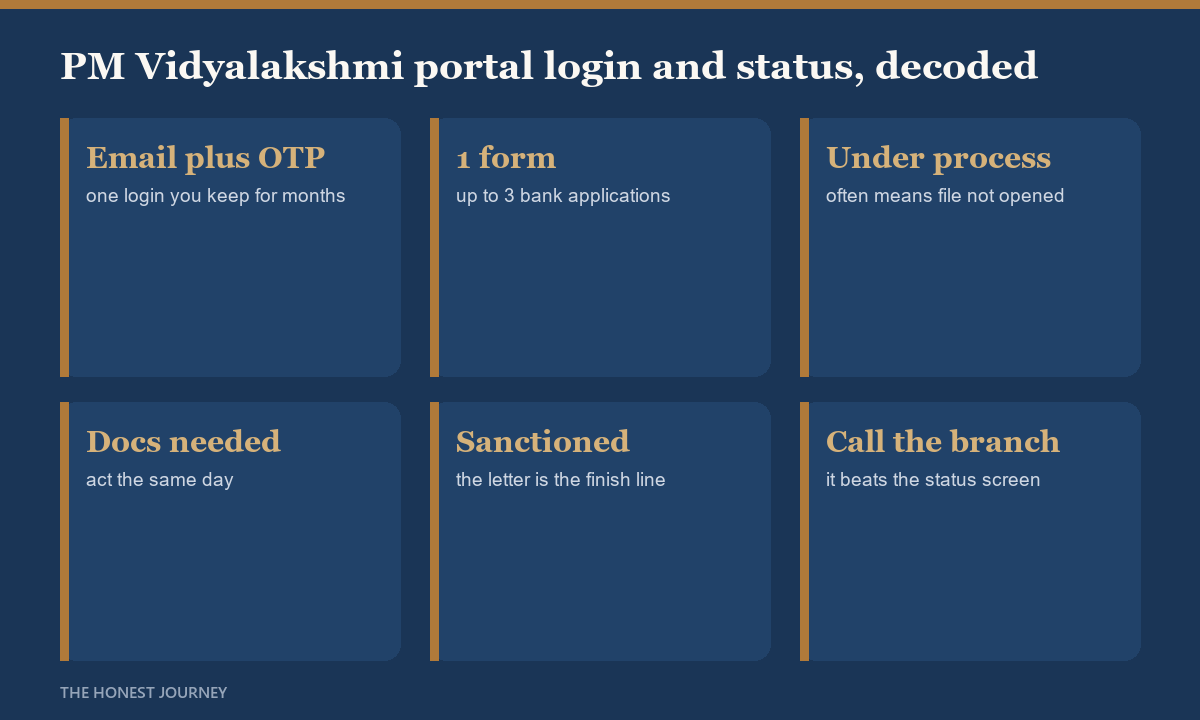
You register on the Vidya Lakshmi portal with an email and a one-time password, create a login, fill the Common Educational Loan Application Form once, and apply to up to three banks. After that you track everything from the dashboard, where each application shows a status. The status that confuses everyone is “under process”: it often means the bank has not actually opened your file yet, not that a decision is close. Knowing which stage you are really at tells you whether to wait or chase.
A reader messaged me in a panic because her application had said “under process” for eleven days and she read that as almost-approved, so she had stopped following up with the branch. It was the opposite. The bank had received the application from the portal but no officer had picked it up. The portal status and the bank’s internal reality are two different clocks, and the portal one moves slower and vaguer. Once she called the branch and gave her application number, the file moved in two days. The status screen will not tell you that. A phone call will.
This guide covers registering and logging in, what each status stage actually means, the login and OTP errors people hit most, and when a status means you should pick up the phone. If you are still weighing whether to use the portal at all, read the honest overview of the PM Vidyalakshmi portal first, and if you have not chosen banks yet, the portal bank list guide shows which lenders are worth your three slots.
How to register and log in on the Vidya Lakshmi portal
Registration is straightforward and free. You go to the official portal, choose to register as a student, and enter your name, email and mobile number. The portal sends a one-time password to your email to activate the account, after which you set a password and log in. From then on you log in with that email and password, complete your profile, and fill the Common Educational Loan Application Form.
Two things trip people up at this stage. First, the activation link or OTP lands in spam or arrives after a delay, so wait a few minutes and check the spam folder before requesting a new one. Second, the email you register with becomes your permanent login, so use an address you will keep and check, not a college address you will lose access to after you leave. You will be tracking this application for months.
What each application status actually means
Once you submit the CELAF and send it to banks, each application carries a status. The labels sound self-explanatory and are not, so here is the honest reading of each:
- Application submitted. The portal has your form. Nothing has reached a human at the bank yet. This is a starting line, not progress.
- Under process by bank. The application has been routed to the bank. In practice this covers everything from “no officer has opened it” to “actively being assessed”. It is the vaguest and longest stage, and the one where a call to the branch tells you far more than the screen.
- Additional documents required. The bank wants something. Act on this fast, because the clock on your admission and visa does not pause while you wait.
- Sanctioned. The bank has approved the loan. The sanction letter follows, and that letter is what your university and visa need. The sanction letter guide covers what to check on it.
- Rejected or closed. This bank has declined. It is not the end of the scheme, only of this one application. What to do next is a whole topic, covered in the loan rejected guide.
Login and OTP problems, and how to fix them
The common failures are dull but fixable. If the OTP does not arrive, wait, check spam, and confirm the mobile number and email were entered correctly before resending. If the portal says your email is already registered, you likely created an account earlier, so use the forgot-password flow rather than registering again. If the password reset link does not come, the same spam-and-wait rule applies. If the portal itself is slow or throws errors, it is usually load, not your account, so try again off-peak rather than creating a second profile that splits your applications.
The one thing not to do is register a second account because the first seems stuck. Two accounts mean two half-tracked application sets and a support problem later. Recover the original login instead.
When a status means you should call the bank
The portal is a submission and tracking tool, not a substitute for the branch relationship. The moment your application shows “under process by bank”, the useful next step is to find the branch it was routed to, call or visit with your application number, and confirm an officer has actually opened the file. This single habit is the difference between a loan that moves in weeks and one that sits for a month while you assume the vague status means something is happening. Chase politely, chase early, and keep your own record of who you spoke to and when.
What the portal actually lets you do, and where it stops
The official student manual is specific about the boundary between what you control and what the bank controls, and it is the part almost no guide mentions.
| Action | The official rule |
|---|---|
| Register | User ID and password created against an email address and mobile number |
| Open the loan form | Aadhaar authentication is required before the form opens |
| Banks per application | Maximum of 3, selected at the preview stage |
| Check status | Track Loan Application, pick the application, Get Loan Status. The status shows with the bank remarks attached |
| Withdraw it yourself | Only while the status still reads Submitted |
| After a bank updates it | You must contact that branch directly for closure or rejection. The portal will not do it for you |
| Alerts | SMS, email and WhatsApp, but only if you tick the consent option on the form |
The two things that go wrong most often
First, the alert consent. It is a radio button on the application form, not a default. Miss it and you will not be told when a bank requests a document or changes your status, so you find out by logging in and checking. Tick it.
Second, the withdrawal window. Students routinely submit to three banks, get a sanction from one, and then assume the other two applications lapse quietly. They do not. Once a bank has moved the status you have to ring that branch and ask for closure, and an application left open at a second bank is a live enquiry sitting against your file.
If you are stuck on either, the portal support addresses are support@pmvidyalaxmi.co.in and pmvidyalaxmi@canarabank.com. Grievances go through Register New Complaint, which issues a grievance ID and lets you re-raise it if the bank reply does not resolve anything.
The honest closing take
Registering and logging in is the easy part and takes ten minutes. The status dashboard is where expectations go wrong, because its labels are vaguer than they sound and its slowest stage hides the most. Treat “under process” as a prompt to call the branch, not a signal to wait. Use one login, act immediately on any document request, and remember that the sanction, not the status screen, is the finish line. The portal opens the door. You still have to walk through it at the branch.
FAQ
How do I log in to the PM Vidyalakshmi portal?
Register once on the official Vidya Lakshmi portal with your name, email and mobile, activate the account with the emailed one-time password, and set a password. After that you log in with that email and password. Use an email you will keep long term, since you track the application for months.
How do I check my Vidyalakshmi loan status?
Log in and open your dashboard, where each bank application shows a status such as submitted, under process, sanctioned or rejected. For anything showing “under process”, call the branch with your application number, because the screen rarely reflects what is actually happening inside the bank.
What does “under process by bank” mean?
It means the application has been routed to the bank, but it covers everything from an unopened file to an active assessment. It is the vaguest and usually longest stage. A call to the branch tells you far more than the status label does.
I am not receiving the OTP or reset email. What now?
Wait a few minutes, check your spam folder, and confirm the email and mobile were entered correctly before resending. If the portal says the email is already registered, use forgot-password rather than making a new account, so your applications stay under one login.
Can I apply to more banks if one rejects me?
Yes. A rejection is one bank declining, not the scheme closing. You can apply to another listed bank, and the loan rejected guide walks through fixing the cause and re-routing.